|
|
|
|
| Overview |
| Deutsch/German,
Español/Spanish,
Français/French,
Italiano/Italian |
|
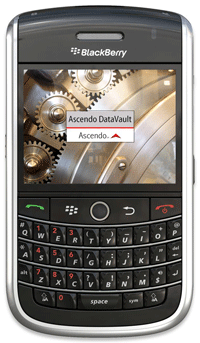
Ascendo DataVault stores confidential information such as Credit Card numbers, usernames, passwords, PINs, etc. on your BlackBerry and
Windows or Mac Desktop using AES, the most powerful
encryption available.
DataVault is the most comprehensive Password Manager for BlackBerry. The rich feature set includes advanced Security Options, Tree and List Views, extensive Browser Integration,
Email Encryption, Desktop Synchronization and numerous Customization settings.
Unmatched features and ease-of-use have made Ascendo DataVault the best-selling Password Manager for BlackBerry.
|
|
| Benefits |
|
|
|
|
|
 Protects private information using powerful encryption and advanced security features. Protects private information using powerful encryption and advanced security features. |
|
Saves time and money by giving you instant access to your personal information anytime you need it. |
|
Adapts to your needs by providing numerous customization options and personalization settings. |
|
|
 FINALLY someone got it right!
 |
| by Christopher
Jones from Dayton, Ohio |
"This product is nothing short
of AMAZING... stable, fully customizable, and you can actually
enter your data on your PC and transfer to your Blackberry - what
a time saver! Every 3rd party app for the BlackBerry should be
this good!!
|
| See all Reviews |
|
|
|
|
| Features |
|
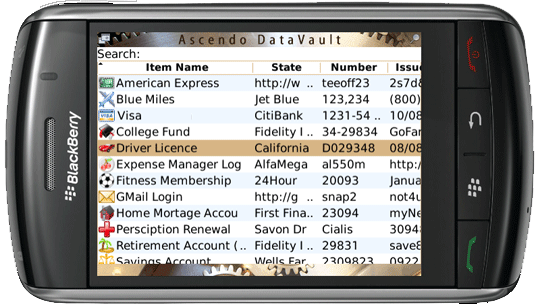
Ascendo DataVault for BlackBerry |
|
|
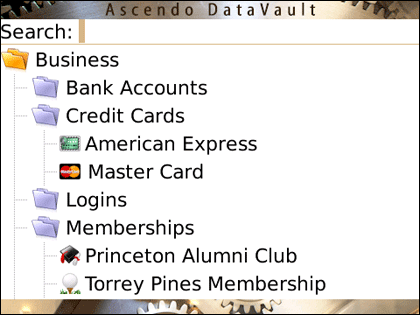
- Display Items in Tree view organized by Category and Type.
- Expand and collapse tree levels individually or simultaneously, see image.

- Set default tree configuration to Expanded, Collapsed or Last Position.
- Define an unlimited number of Categories such as Personal, Business, etc.
- Define an unlimited number of Types such as Credit Cards, Bank Accounts, Logins, Memberships, Prescriptions, Vehicle Information, etc. More below...
- Navigate intuitively in List view with Roll & ScrollTM using track ball to move down through items and across fields.
- Set number of fields to display in List view. Anchor item name column when scrolling vertically.
- Full support for Storm touch screen including screen tap to display record and finger swipe to scroll.
- Reorder columns by tapping on column header (Storm).
- Resize columns by holding finger down on column header and sliding (Storm).
- Customize numerous aspects of List view including number & size of columns, fonts, hide/show filter, etc.
- Find items quickly using First Letters, String Included or Extended Search.
- Display items in View mode to maximize the number of fields per screen or Edit mode to maximize the space available for each field.
- Tap or click on URLs to launch web sites, telephone numbers to initiate calls or emails to send a message.
- Create an unlimited number of Templates with default field labels and item icon or choose from 25 pre-defined Templates. More below...
- Encrypt and decrypt emails using BlackBerry email client.
- Import and encrypt BlackBerry Notes and BlackBerry Contacts.
- Share items securely with other DataVault users by email or by "beaming" them over Bluetooth using DataVault Exchange Format.
- Select from 10 Skins to display screen graphics and colors.
- Choose font family, size and style for screen text.
- Store items in 10 fields of up to 256 characters and note field of up to 10,000 characters.
- Associate icons with Items and Templates, 100 icons to choose from.
- Set defaults navigation options and use shortcuts for fast navigation.
- Duplicate Items to speed data entry.
| |
Ascendo DataVault Desktop for Windows & Vista |
| DataVault Desktop on a Mac? Click
here. |
|
- Synchronize DataVault items with DataVault for BlackBerry and/or DataVault for iPhone & iPod
Touch.
- Resolve conflicts in case your entries don’t match (two-way synchronization).
- Advanced Browser Integration with Firefox, Internet Explorer and Chrome.
- Fill web forms automatically. For example, click on Gmail item in DataVault to open browser, go to Gmail login, auto-fill username & password and submit form.
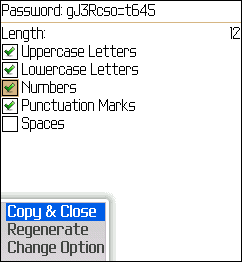
- Use DataVault Toolbar in browser save forms to DataVault and generate passwords.
- Create desktop shortcuts for web form logins.
- Fight phishing scams that try to get you to log into phony sites. DataVault will only enter usernames and passwords for URLs in the database. More below...
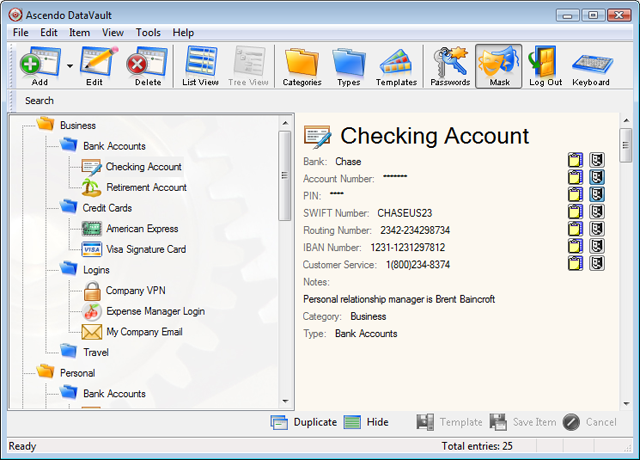
- Display items in Tree view organized by Category and Type.
- Drag & drop items or Types to different locations in the Tree.
- Set options for displaying Tree in Expanded, Collapsed or Last Position by default.
- Display items in List view. Find items quickly by reducing list after each keystroke.
- Filter items by Category and Type.
- Hide item details panel to maximize the number of fields displayed in List View.
- One-click editing in List View.
- Customize Colors and Fonts.
- Duplicate item and use Templates to speed data entry.
- Mask individual fields or copy to Windows clipboard.
- Mask/Unmask all fields with one click.
- Import data from CSV files and from several 3rd party products like Cryptmagic, MiniSafe, SplashID, Illium EWallet, CodeWallet Pro, FlexWallet, Handy Safe, Spb Wallet, Palm Secret, IE, Firefox, Roboform and several others.
- Share information securely with other DataVault users by exporting & importing items in DataVault Exchange Format.
- Backup & Restore, export to a CSV file.
- Compatible with Windows 7, Vista, XP. High resolution buttons and icons.
|
Powerful Security Features
- Choose Master Password Hint.
- Set optional password for unmasking fields.
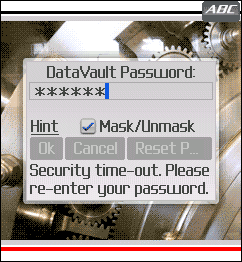
- Set Security Time Out to log out automatically after a user-defined inactivity delay.
- Enter passwords with Desktop screen keyboard to fool key-loggers.
- Maintain activity log on Desktop to verify that you are the only person using the application.
- Set automatic backup option.
Download DataVault with Free Trial period now!
|
| Awards & Certificates |
|
|
|
|
|
| Ascendo Wallet Suite |
|
| Ascendo DataVault is part of the Ascendo Wallet suite of applications
including Ascendo Money,
Ascendo Photos and Ascendo iJuggle. |
|
| Requirements |
|
Ascendo DataVault - Password Manager for BlackBerry, requires BlackBerry OS 4.0 and above and 750k of free disk space.
See below for a partial list of supported models*.
|
BlackBerry Torch, BlackBerry 8900, BlackBerry 89xx, BlackBerry Storm 2, BlackBerry 9550, BlackBerry 9530, BlackBerry Storm, BlackBerry 9500, BlackBerry 95xx, BlackBerry Bold, BlackBerry 9700, BlackBerry 97xx, BlackBerry 9000,
BlackBerry 90xx, BlackBerry Tour, BlackBerry 9630, BlackBerry 96xx, BlackBerry 8900, BlackBerry 89xx, BlackBerry Curve, BlackBerry 8300,
BlackBerry 8310, BlackBerry 83xx, BlackBerry 8800, BlackBerry 88xx, BlackBerry Pearl, BlackBerry 81xx, BlackBerry 87xx, BlackBerry 77xx, BlackBerry 75xx,
BlackBerry 72xx, BlackBerry 71xx
|
* Device numbers ending in "xx" mean all devices in the series.
* Other compatible models may not be listed. If you are unsure, please download the free trial version available from our
FAQ page.
Ascendo DataVault Desktop for Windows & Vista requires 10Meg of free disk space.
|
|
|
|